Water system monitoring and analysis
Distribution pressure, pressure reducing valve (PRV) performance, reservoir levels and water quality — whether you run a few sensors or several thousand measurement points.
The data is there. It is just in three places.
Pressure is recovered from a logger days after the problem. PRV behaviour is an assumption between inspections. Chlorine residual is measured by a sensor that reports to SCADA, and the lab results that confirm it arrive separately. So the logger portal, the SCADA historian and the lab results sit in three separate places rather than one common repository.
None of that is a sensor problem. It is a consequence of data being organised by where it comes from — the logger vendor, the SCADA system, the laboratory — instead of by the question you are trying to answer. Collect it in one place, see it as it arrives, and shape it around those questions.
How flowworks answers them
Each of the problems above has a specific answer, not a general one.
The pressure problem
Pressure at every monitored point is current, not recovered from a logger days later. When it drops below a threshold the alarm names the site, the value and the time, and the history behind it is one click away — so whether the complaint is valid is a question you answer the same afternoon.
The PRV you only see at inspection
Watch upstream and downstream pressure continuously and the station’s behaviour stops being an assumption between visits. You can see whether it opens and closes at the pressures it is set to, and whether it is sticking, from the record rather than from a site visit that happens to catch it.
Chlorine residual at the end of the system
Readings from the residual sensor come in as a channel, directly or through SCADA, and are alarmed like any other, so a failure to reach the end of the system is something you are told about rather than something the next sampling round discovers. Lab results are stored alongside the online sensors, so the two can be compared directly instead of in a spreadsheet.
Your SCADA data alongside everything else you collect
infinitii flowworks is not a replacement for your SCADA system and does not try to be one. It is where SCADA data becomes useful next to everything your SCADA system does not hold — the logger data, the rain gauges, the public sources, and lab results held against the site. Where a lab value needs to behave like a sensor reading, it is uploaded into a channel created to hold it, or fed in automatically from a connected system.
Once a SCADA point is a channel, it behaves like any other channel. That is what makes the combinations possible.
- Build a new channel from SCADA inputs and sensor inputs together — a calculation neither system could do alone
- Quantify a relationship between any two parameters with curve fitting — linear, polynomial, exponential, logarithmic or power
- Set alarms and notifications on SCADA values, delivered by web, email, SMS or voice
- Run FACE Pro pattern recognition against SCADA data, for anomaly detection and behaviour that a fixed threshold will not catch
- Graph SCADA values on the same chart as rainfall or any other telemetry source
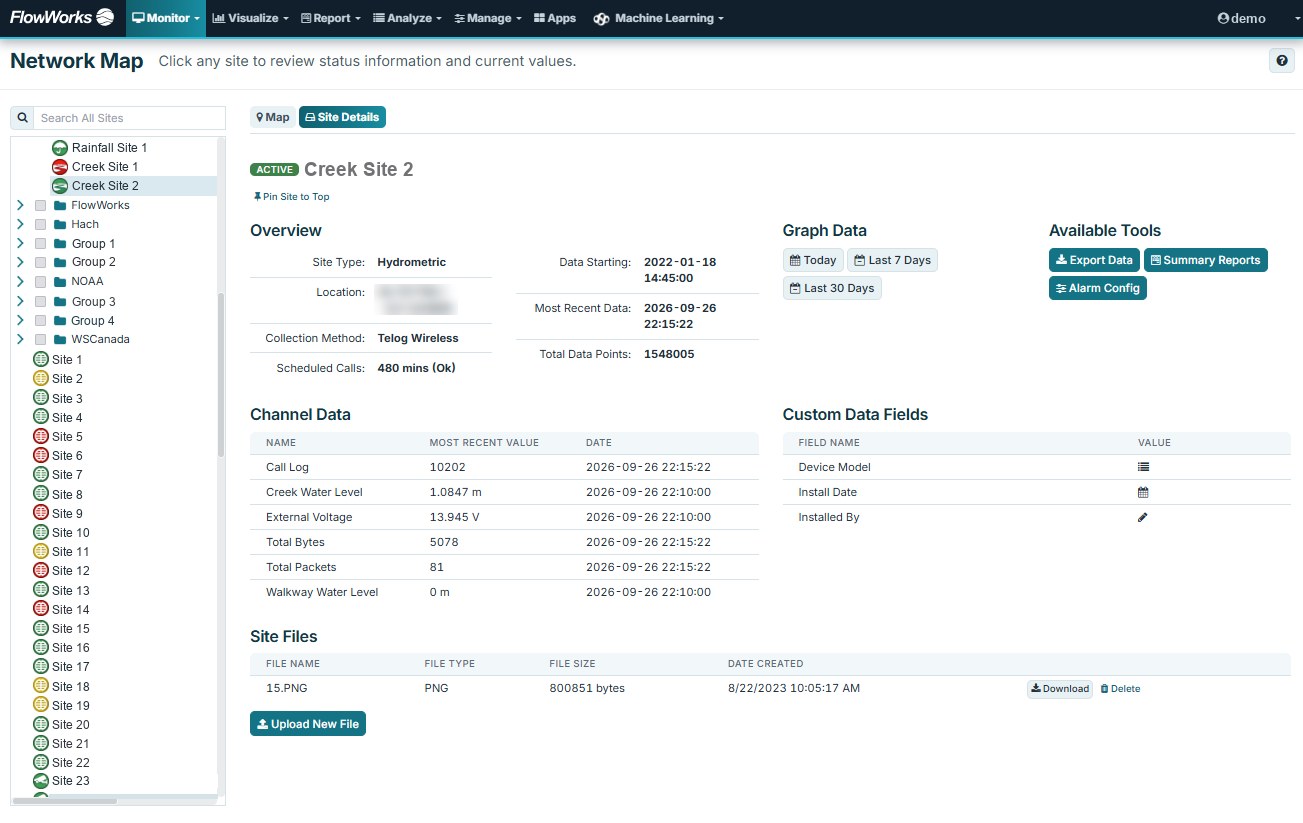
Once everything is in one system, it can be seen in one place. Every site appears on a map with its present value and alarm state; click one to reach its history, its graphs and its metadata. And a custom dashboard puts the whole network on one screen — pressures, reservoir levels and residuals arranged for a control room or a duty phone rather than for the database.
Calculations built around your system
FACE, FACE Pro and the API turn the channels you collect into the numbers you actually ask about. Each result is a channel you can graph, alarm and report on like any other.
FACE
Calculated channels without programming — the pressure differential across a PRV from its upstream and downstream sensors, or a rolling average of chlorine residual — set up line by line and running continuously against live data.
FACE Pro
Your own Python or R, running continuously: pattern recognition on SCADA and sensor data to highlight anomalies a fixed threshold misses, or an EPANET model run against live data rather than a prepared input file.
The API
Carries measured and calculated channels out again — to other applications, or to your own public or internal website.
Beyond pressure and flow
Infrastructure condition, in pictures
A field camera records the condition of an intake, a reservoir or the structures around them, and each image is stored as a photo channel: time-series data, displayed alongside the sensor readings — so you can see what the site looked like at the moment a reading changed.
Site metadata and records
Details that do not change with every reading — asset information, verification measurements, field observations — are kept as custom fields on the site, and reports and documents can be attached to it. Water quality reports stay with the site they relate to.
Public sources in, your data out
Public sources — NOAA, Environment Canada, weather modelling services — are brought in over web API and shown alongside your own sensor and SCADA data, so forecast and observed conditions can be compared with what your network is measuring. The flowworks API runs the other way too, publishing live channels to your own public or internal website.
Who this helps, and how
Running the distribution system
Know the state of the network without waiting for a problem to be reported. An alarm carries the reason, the threshold or calculation behind it, and the history, so whoever receives it can see why it fired.
Keeping the data defensible
Flag and correct suspect readings without destroying the original. Every edit keeps an audit trail, and corrected values are published as their own channel so everyone downstream is working from the same numbers.
Planning and capital work
Compare this year against the last ten at the same sites, and take the evidence into a prioritisation argument in a form other people can check.
Confirming a site is actually live
After an install, see immediately whether data is arriving and whether it looks sane — on a phone, at the site, before leaving it.
Questions this answers
Taken from what water operators actually ask of their data.
- Where are my sites, and what are the current conditions?
- What have flows and pressures at a group of sites looked like this week? This year? Over ten years?
- How many start/stops per day are my pumps doing, and is one performing better than the other?
- What were the minimum, average and maximum flows at a site last month?
- Can I see a year of water quality results for a site, against the online sensors?
- Are the low-pressure complaints from that neighbourhood valid?
- How is that PRV station performing — is it sticking? Does it open and close at the right pressures?
- Are we chlorinating enough to reach the end of the system?
Related
Facilities
Pump stations, treatment plants and PRV stations: run hours, duty balance and compliance.
Visual
Camera imagery for sites where a number alone does not explain what happened.
Wastewater
Collection systems, overflow monitoring and inflow and infiltration (I&I) analysis.
See it on your own network
A demo runs on your sites and your history. Bring a question you have not been able to answer easily and we will start there.